
IDCARDplaza prints and personalizes cards, wristbands, key fobs, and passes for you.
File Submission Specifications #
To ensure the quality of your printed cards, IDCARDplaza has a number of guidelines for submitting print files:
- Preferably a scalable vector file (Adobe Illustrator or Adobe InDesign)
- Or a PDF file with a minimum resolution of 300 dpi and embedded fonts
- If you use non-standard fonts (for example in your logo), please also supply these files as .ttf or .otf
- Color settings preferably in CMYK
- Only if absolutely necessary: a PNG or JPG file with at least 300 dpi (for a credit card this is 1015 × 640 pixels, but preferably much higher)
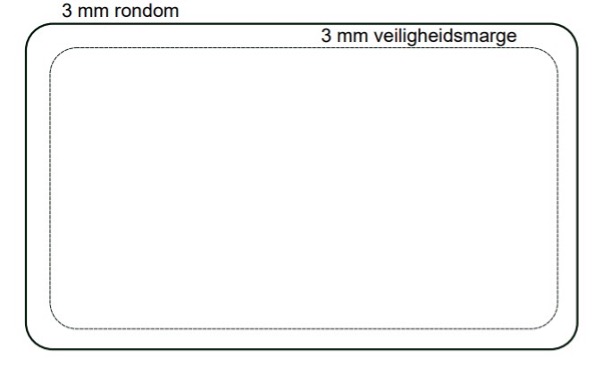
When designing your card or having it designed, we recommend keeping a margin of 3 mm from the edges of the card. All our cards have rounded corners, so you do not need to take this into account in your design.
IDCARDplaza charges €95 per hour to create your design. Advice regarding your design and possibilities is provided free of charge. Before production starts, you will receive a (digital) proof for approval.
About Colors #
The color composition for printed materials is standard CMYK. The actual color of the printed card may differ from what you see on your screen:
- Your monitor, digital camera, or scanner works with RGB light
- Our printing process uses CMYK (four-color printing), which has a different color range
- Designers use expensive, calibrated monitors to assess colors. Most people use monitors that are too bright, making printed colors appear dull. Even if you use CMYK in your design, you should expect up to a 10% color deviation
If you want to be certain of a specific color (for example for your logo or a specific background), you can use Pantone Matching System colors. You select a color from a printed color guide and provide us with the color code. For an additional fee, we can print your card in the desired PMS color.
Personalization #
If you want to add a passport photo or signature to your card, we recommend leaving space in the design where the photo will be printed. For a smooth transition between the photo and the card background, you can allow the edges of the photo area to fade out. This creates a softer transition between the background and the photo.
Photos should be supplied as .jpg files, with a standard 3:4 ratio and a minimum resolution of 300 dpi, each with a unique file name. A different ratio is possible, but if so, we recommend accounting for this in your card design. We do not edit the photos afterward—the quality you provide will be printed on your card. Please keep this in mind when submitting your images.
Other information required for personalizing the cards—such as name, student or employee number, and photo file name—should be submitted in an Microsoft Excel file.
Based on your submitted files, you will receive a (digital) proof for approval the first time. We ask you to carefully check your proof for any errors before giving approval. After your approval, production will begin, and we are not liable for any inaccuracies.
If you have any questions, please contact us. We are happy to assist you.
Contact us to learn more about options and pricing.
Call us: +31-182-389540 or
Email us: sales@easylogic.nl